Choosing a website platform should be simple. In practice, it rarely is.
Web design is the planning of how a website communicates and works: its content, navigation, visual hierarchy, interaction and behaviour across different devices. The finished design might be assembled with a visual builder, generated from code or developed through a mixture of both. The tool affects what is easy to build and maintain, but it does not replace the design decisions.
Professional developers have long built websites with content management systems such as WordPress, Joomla and Drupal. Static websites offer a more direct developer-controlled architecture. Wix, Squarespace and Shopify take the hosted software-as-a-service route, while newer AI services promise to turn instructions into pages or working software.
They sound like competing versions of the same thing, but they are not.
These are different types of website production. In this guide, a professional website means a developer-led build using an open-source CMS or development stack. A DIY website means a site created through a hosted software-as-a-service platform designed to let customers build and operate it themselves. Under that definition, Wix, Squarespace and Shopify belong to the DIY category, while AI builders form a distinct group of their own, covered separately below. Agencies and developers may work with these products, but that does not change the platform’s self-service SaaS model.
DIY websites are increasingly capable of looking polished, but appearance alone does not turn the self-service model into professional web development.
The useful question is therefore not simply, “Which platform is best?” It is:
What must the website do, who will maintain it, and how much freedom will the business need later?
Once those three points are clear, the shortlist usually becomes much smaller.
A website has three layers: input → process → output
A website is what people see in the browser, but that visible result is only the output. Two websites can look remarkably similar while being created, owned and operated in completely different ways.
The full flow has three layers:
- Input — the business goals, content, products, data and actions the website must support.
- Process — how those inputs are turned into a working website: the platform, code, design and development method, hosting, database, plugins, integrations, deployment and people responsible for it.
- Output — the pages and interactions presented to visitors, customers and search engines.
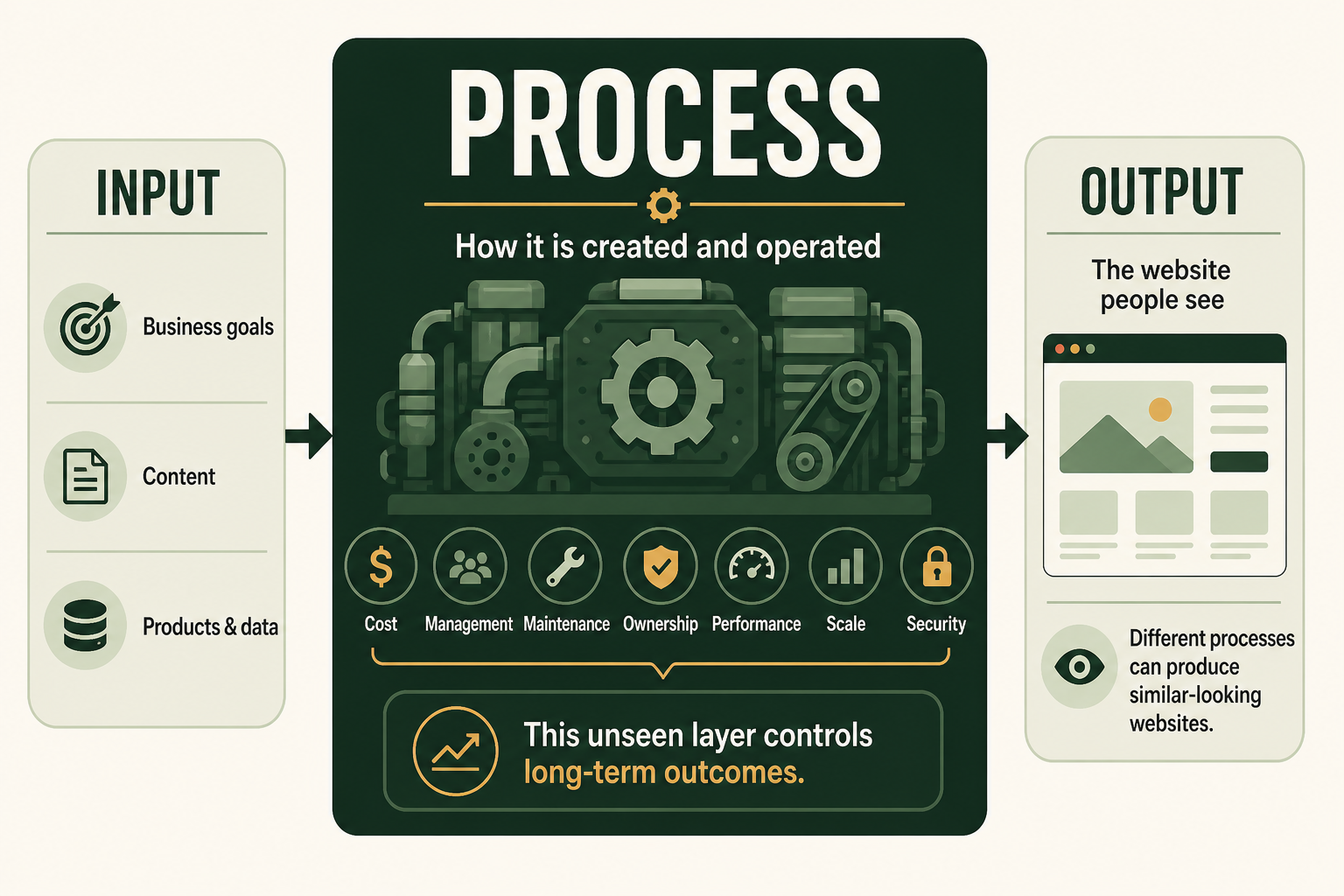
The process is often ignored because visitors cannot see it. It is nevertheless the most important part of the decision because it determines:
- Cost: Whether the website depends on continuing payments to a private platform or is an asset the business can keep and move. An owned static website can sometimes run on free hosting indefinitely; WordPress and other dynamic systems normally still need hosting, while domains, payment processing and optional commercial tools remain separate costs.
- Ownership: Whether the business is locked into a private provider such as Wix, Squarespace or Shopify, or controls the website’s files, content and database through an open-source system such as WordPress or a custom build. Ownership determines whether the business can change host or developer without rebuilding everything.
- Features: Whether the website can gain whatever functions the business needs or is limited to features, applications and integrations approved by one provider. The process determines whether a new requirement can be developed, connected or only requested from the platform owner.
- Management: Who can update pages, products and settings, which tools they must use and whether everyday changes require the platform owner, internal staff or a developer.
- Maintenance: Whether the SaaS provider maintains the underlying platform or the business and its developer are responsible for software updates, backups, compatibility and technical repairs.
- Support: Who is accountable when help is needed. SaaS support normally covers the provider’s platform, but may not resolve design decisions, third-party applications or business-specific integrations. A professionally managed website can have named technical support responsible for the complete implementation. The size of the available community matters alongside it. A large open-source community—WordPress being the clearest example—produces extensive public documentation, active forums and a wide pool of developers to hire from, so most problems are ones someone has already solved and written up publicly. Smaller communities such as those around Joomla and Drupal mean fewer public answers and fewer available specialists, while a closed SaaS platform concentrates every answer in the provider itself.
- Performance: How much control exists over the code, hosting, database, caching and delivery of each page. Two similar designs can load very differently because their underlying processes are different.
- Scale: Whether the website can grow by changing infrastructure and code, or only by moving through the plans, applications and limits offered by one provider.
- Security: Who controls security updates, access, backups, data handling and incident response—and who must act when something goes wrong.
A WordPress website, a custom static build, a Shopify store and a Wix site may all produce a clean homepage with the same headline, photograph and contact button. The output can appear equivalent. The process underneath is not—and that hidden difference is what this comparison is really about.
How web design moved from hand-coded pages to website platforms
The first websites were documents written and published by people who understood the underlying technology. The World Wide Web was invented at CERN in 1989, the first web server was running by the end of 1990, and the software was announced publicly in 1991. Early websites were assembled directly from code and were mainly designed to organise and share information. CERN’s history of the Web records how quickly the system moved from a research tool towards global use.
As the commercial web expanded, a website stopped being a technical experiment and became a normal business requirement. Companies needed to publish news, change prices, add pages, accept enquiries and eventually sell online. Hiring a developer for every small content change was slow and expensive, while maintaining a growing site as a collection of hand-edited files became cumbersome.
E-commerce began as a function of the website, not as the name of a particular platform. Developers connected product catalogues, baskets, payment gateways, customer information and order databases through custom code. In other cases, commerce was added as a layer over an existing website using a shopping-cart script, a CMS extension, a hosted checkout or another third-party payment tool. The defining event was the transaction: the website could take an order and payment online.
That need created the market for content management systems and hosted website builders.
Developer-oriented content management systems formed the first major layer of reusable professional website technology. Drupal began in 2001, WordPress followed in 2003, and Joomla emerged in 2005. They gave developers extensible foundations for content, users, permissions, templates and custom functions without requiring every project to begin from an empty codebase. WordPress, Joomla and Drupal remain open-source systems that can be extended for specialised requirements.
Hosted self-service products developed alongside and after that professional CMS layer. Squarespace was founded in 2003 and launched its managed service in 2004. Shopify launched as an e-commerce platform in 2006, while Wix was founded in the same year around visual website creation without complex coding. These services combined more of the editing, hosting and platform administration into one commercial product. Squarespace, Shopify and Wix describe that part of their history in their own records.
The current AI wave reduces the barrier again. Instead of selecting every block or writing every line of code, a user can describe the business and ask software to generate a starting point. That can make creation faster, but it does not remove the need to decide what the website is for, how it should be structured or who will be responsible for it after launch.
First, understand the four website groups
The clearest starting point is the professional website: the developer-led category from which modern CMS projects, custom systems and maintained business websites developed. DIY privately-owned CMS platforms follow immediately because they answer the same question—open-source or vendor-controlled—as a different kind of CMS. AI builders come next because prompt-driven generation is a third, distinct build method, before E-commerce closes the list as a function rather than a build method. Static delivery is a different question again—not how or why a site is built, but how it is output to a visitor—so it sits apart from this list under Website Output Types.
Professional websites: content management systems, code generators, web engines and custom builds
Professional websites are planned, designed, developed and maintained by people who understand the underlying web stack. That work happens through one of four build methods: a content management system, a code generator, a web engine, or a fully custom build made by hand. Each hands the business a website it can own outright and extend on its own terms, rather than one confined to the options exposed by a single hosted product.
The word “professional” here describes the development and operating model. It does not merely mean that the finished pages look attractive. A DIY website can be made to look increasingly professional, but it remains a self-service website when its structure and operation are governed by the builder rather than a developer-led implementation.
- Content Management System. A CMS separates the public website from the tools used to manage it: a developer creates the theme, content model, permissions, integrations and deployment process, while authorised staff use the CMS to publish and update material without touching code.
- Open-source CMS — WordPress, Joomla, Drupal and Ghost, profiled below, are owned outright and can move between developers or hosts freely.
- Privately-owned CMS — trades that portability for a vendor-managed product: the licence, roadmap and hosting are controlled by one company, which can suit an organisation that wants CMS structure without maintaining open-source infrastructure itself, at the cost of being tied to that vendor. Wix, Squarespace and Shopify, profiled in the DIY section below, are common examples.
- Code Generators. These tools turn a prompt, an image or a set of HTML blocks directly into working code, rather than assembling a page inside a closed editor. v0 by Vercel is the clearest example: it generates a full application from a text prompt, syncs the result to a developer’s own GitHub repository, and can be deployed anywhere—not only to Vercel. That ownership of the generated code is what separates a code generator from a DIY AI builder such as Lovable or Wix’s AI tools, where the created site typically stays inside the vendor’s own hosted platform. Netlify occupies an adjacent role here: rather than generating code itself, it positions as a deployment platform built for output from AI coding agents such as Claude Code, Cursor and Codex, alongside conventional frameworks.
- WebEngine. These are visual builders whose output is real, exportable code rather than a page that only runs inside the vendor’s own system. Webflow is the standard example: a site is designed visually from templates, and Webflow’s own Help Centre documents exporting that design as standard HTML, CSS and JavaScript a developer can then self-host or hand off. That export step is what makes a web engine a professional build method rather than a DIY SaaS builder—the business is not required to keep paying the tool to keep the website live.
- Custom Built. A site built from scratch, hand-coded without a CMS, generator or web engine—or a deliberate mix of the three methods above, assembled by a developer to fit the project. Adobe Dreamweaver is a long-running example of the tooling this method uses: fundamentally a code editor and WYSIWYG design surface for building and maintaining a site by hand, rather than a content-managed, generated or template-exported product.
What do Professional Websites Use
Professional Web developers tend to avoid Privately-owned CMS due to their limitation and lack of flexibilities.
Instead, they typically reach for an open-source CMS such as WordPress, Joomla, Drupal or Ghost when the project is primarily content-led, a code generator or web engine when speed and a clean, exportable codebase matter more than an existing plugin ecosystem, and a fully custom build when the requirements do not fit any existing product. The common thread across all three is ownership: the code, data and hosting decision stay with the business rather than a vendor.
The limitation is structural rather than cosmetic. A privately-owned CMS ties the site’s roadmap, pricing, hosting and available integrations to a single vendor’s decisions, so a requirement the platform does not support cannot be built around—it can only be requested. That trade-off is acceptable for an owner who wants a self-service platform, but it works against a developer’s brief to deliver something the client can extend indefinitely.
Advantages of professionally built websites
- The structure can be designed around the organisation, audience and content rather than a fixed builder workflow.
- Developers can create bespoke themes, content types, permissions and integrations.
- The website can be hosted, monitored, backed up and maintained under a defined technical process.
- Open-source systems provide greater control over code, data and future hosting choices.
- Complex content, multilingual publishing, membership, editorial workflows and custom business functions can be supported.
- Performance, accessibility, analytics and search foundations can be tested deliberately before launch.
Disadvantages of professional websites
- Design and development require a larger initial budget than assembling a DIY site.
- Discovery, content preparation, development and testing take time.
- Hosting, updates, backups and security need ongoing professional attention.
- Poorly selected plugins, extensions or custom code can create technical debt.
- The business needs clear documentation and ownership to avoid unnecessary dependence on one developer.
1. Open-Sourced Content Management System
Every platform in this group ships with a library of prebuilt themes and templates that a developer can adapt to the business’s own design and content, rather than building a layout from a blank canvas.
WordPress
In this comparison, WordPress means the open-source software available through WordPress.org, not one particular managed WordPress hosting plan.
WordPress began as publishing software and developed into a flexible content management system supported by themes, plugins, APIs and a large developer ecosystem. It can support a business website, publication, membership service or substantial custom build. WordPress describes itself as open source and notes that it can be used out of the box or customised extensively. WordPress’s official overview covers both principles.
A sensible fit: business websites and publications that need strong editorial control, broad extensibility and a wide choice of developers or hosting providers.
The trade-off: its popularity produces an enormous range of themes and plugins of uneven quality. Professional governance is needed to keep the stack focused, secure and maintainable.
Joomla
Joomla is an open-source CMS and application framework with built-in support for structured content, multilingual websites and multiple user permission levels. Its framework can also be extended by developers for directories, reservation systems, catalogues and other specialised functions. Joomla’s official overview describes both the CMS and its developer framework.
A sensible fit: organisations that need more built-in content structure and access control than a simple publishing site, without moving immediately to the complexity of a large enterprise platform.
The trade-off: its ecosystem and available talent pool are smaller than WordPress’s, so extension choice, maintenance capability and future developer availability should be confirmed early.
Drupal
Drupal is an open-source content management platform and framework designed for structured content, granular permissions, multilingual publishing, integrations and substantial digital estates. Drupal distinguishes between its flexible developer foundation and a newer ready-to-use CMS product, but the core platform remains particularly relevant to agencies, public bodies, universities and enterprises with complex requirements. Drupal’s official explanation sets out those use cases.
A sensible fit: large or complex organisations that need rigorous content models, governance, workflows, security and integration with other systems.
The trade-off: Drupal usually requires more specialist architecture, development and operational knowledge than a straightforward small-business website warrants.
Ghost
Ghost is the newest of these systems and the narrowest by design. It is an open-source publishing platform run by a non-profit organisation and was founded in April 2013, roughly a decade after the other three, on Node.js rather than PHP. Where WordPress, Joomla and Drupal are general-purpose content management systems, Ghost concentrates on publishing: newsletters, memberships and paid subscriptions are part of the core product rather than plugins added to it. Ghost’s official overview sets out that scope.
A sensible fit: content-led websites, publications and membership or subscription businesses that want an owned, fast publishing stack with editorial and audience tools built in rather than assembled.
The trade-off: the narrow scope is the point, so requirements outside publishing—e-commerce, complex content models, directories or bespoke business functionality—are better served by a general CMS. Its developer pool, theme market and extension ecosystem are considerably smaller than WordPress’s, and self-hosting expects Node.js competence rather than the commodity PHP hosting the other three run on.
2. Privately-owned Content Management System
DIY website builders entered the market to make publishing accessible to people who did not want to commission or maintain a developer-led website. SaaS platforms combine the editor, hosting, platform administration and common features into a subscription product. The customer works through the controls the provider exposes rather than managing the underlying code and infrastructure. Each of these platforms ships with a gallery of prebuilt templates that the owner or a hired developer can modify to the business’s own needs, rather than building a layout from scratch.
For this comparison, anything delivered as a hosted SaaS website-building product is placed in the DIY group. This includes Shopify as well as Wix and Squarespace. The products may be used by agencies and may produce sophisticated results, but their target operating model remains self-service on the provider’s platform.
This category has improved considerably. Modern templates, responsive components and AI-assisted setup can produce a polished appearance. That visual improvement should not blur the distinction: a DIY website is still operating inside a proprietary self-service platform rather than its own professionally managed implementation.
Advantages of DIY websites
- Lower initial cash cost when the owner is willing to invest their own time.
- Fast route from an idea to a basic live site.
- Visual editing makes routine text and image changes accessible.
- Hosting, platform updates and core security are largely handled by the provider.
- Templates and AI tools can provide a credible visual starting point.
Disadvantages of DIY websites
- The owner must make decisions normally handled by a designer, copywriter, developer and search specialist.
- A polished template does not guarantee clear messaging, sound information architecture or an effective conversion path.
- Advanced functions often require extra applications, higher plans or platform-specific workarounds.
- The business has limited control over the underlying platform and its future product decisions.
- Subscription, application and transaction costs can grow as more features are added.
- Moving away later may require a partial or complete rebuild.
- Template customisation and mobile corrections can consume far more time than expected.
Wix
Wix is a hosted visual website builder. Its main strength is the amount of direct layout control it gives a non-technical user, supported by templates, business tools and AI features. Wix describes its builder as a no-code, drag-and-drop system with AI-assisted creation. Wix’s website-builder overview explains that model.
A sensible fit: small service businesses, personal brands, portfolios, events and brochure websites whose owners want to assemble and change the site themselves.
The trade-off: the freedom to place and style many elements can make design consistency harder. Complex requirements may push the project towards platform-specific workarounds or a later rebuild.
Squarespace
Squarespace is also a hosted, all-in-one builder, but generally places stronger design guardrails around the editing experience. It is often considered for portfolios, service businesses, hospitality, creators and image-led brands.
A sensible fit: a compact self-built website where appearance, imagery and straightforward editing matter more than unusual workflows or deep integrations.
The trade-off: its constraints can help preserve visual consistency, but may become restrictive when the business needs bespoke layouts, complex data or custom operational functions.
3. AI Website Builders / Generators
AI builders are grouped separately in this comparison because they differ from every other group on the same axis: how the website comes into being. A DIY platform such as Wix or Squarespace still requires the owner to select and arrange templates, blocks and pages by hand. An AI builder generates a working starting point directly from a prompt or guided questionnaire, with the platform doing the assembly work a DIY owner would otherwise do themselves.
That generative step does not by itself decide who owns the result. The code generators covered under professional websites are also AI-driven, but they hand the output to a developer as code that can be owned, moved and self-hosted. Products marketed as “AI website builders” typically keep the created site inside the vendor’s own hosted platform instead—closer to a SaaS operating model. Creation method is what separates this group from DIY and privately-owned CMS platforms; hosting model is what still separates it from the code generators in professional websites.
AI can propose page structures, write draft copy, select imagery, generate code and help revise a design. AI can also assist professional developers inside WordPress or a custom workflow, but a hosted service selling prompt-to-website creation directly to customers sits in this group rather than in DIY or professional websites. Many AI builders also offer a gallery of prebuilt starting templates alongside the prompt-based flow, which a user can select and then modify to their own needs rather than generating entirely from a blank prompt.
Advantages of AI-assisted website creation
- Very fast first drafts and prototypes.
- Removes the blank-page problem for copy and layout.
- Makes it easier to explore multiple directions before committing.
- Can reduce repetitive implementation work.
- Gives non-technical users a more conversational route into website creation.
Disadvantages of AI-assisted website creation
- Generated structure may be plausible but generic.
- Copy can make unsupported claims or fail to reflect the business accurately.
- Accessibility, mobile behaviour, forms, analytics and search details still require verification.
- Repeated prompting can create inconsistent design or increasingly fragile code.
- The ease of generating features can hide the future cost of maintaining them.
AI is most useful when treated as an accelerator inside a controlled process, not as a substitute for the brief, content ownership or final quality assurance.
Lovable
Lovable belongs to the AI Builders category, although its output can go beyond a conventional website. It is designed to generate full-stack web applications from natural-language instructions. Its documentation says that projects can include a front end, back end, database, authentication and integrations, with editable code that can be synchronised to GitHub. It can create a marketing website, but it is also intended for software-like products such as dashboards, portals, marketplaces and internal tools. Lovable’s official introduction explains that broader scope.
That makes Lovable different from selecting a template in Wix or Squarespace. It can generate a codebase and custom behaviour, which offers more flexibility but also introduces software-development concerns: requirements, data handling, authentication, testing, security, deployment and future code maintenance.
A sensible fit: prototypes, interactive products, portals, internal tools and web experiences whose custom behaviour is central to the idea.
The trade-off: it may be more technology than a straightforward five-page business website needs. A generated application should also be reviewed with the same seriousness as other production software, especially when it handles personal data, payments or user accounts. Lovable itself includes a security-review step in its publishing guidance. Lovable’s publishing documentation makes that step explicit.
Base44
Base44 markets itself as a “vibe coding” platform for building apps, websites and AI agents from a prompt, with backend and storage built in rather than configured separately. Base44’s own site describes it as a no-code AI platform: describe what you want, and the platform handles data storage, authentication and logic without the user configuring a database or wiring up a payment provider directly.
That closed, backend-included model sits further towards the no-code end of the AI Builders spectrum than Lovable, which explicitly offers editable code synchronised to GitHub. Base44’s own marketing makes no equivalent code-ownership claim, positioning it as a fully-hosted product rather than a source of exportable code.
A sensible fit: non-technical founders and small teams who want a working app, internal tool or AI agent live quickly, without taking on responsibility for the backend, database or hosting themselves.
The trade-off: without the code-export path Lovable offers, moving the resulting product off Base44 later means rebuilding it elsewhere rather than migrating an owned codebase—the standard DIY trade-off applies here even though the output is more like software than a website.
4. E-commerce websites: adding products, orders and payments
E-commerce is the ability to conduct a commercial transaction online. At its simplest, that might mean presenting one product or service and connecting a secure third-party payment page. A fuller store may need a catalogue, basket, checkout, payment processing, tax, stock, shipping, discounts, returns, customer records, notifications and reporting. Established e-commerce platforms typically ship with prebuilt store templates that a merchant or developer can modify to their own catalogue, branding and requirements rather than designing a storefront from scratch.
Shopify did not define e-commerce. It packaged many of those existing functions into a purpose-built DIY SaaS product. Before that model became popular with self-service merchants, online stores were commonly custom-built or added as a commerce layer on top of an existing website.
The main ways e-commerce is implemented
Custom-built commerce
Developers can build the catalogue, basket, checkout and order workflow around the organisation’s precise requirements, then connect one or more payment gateways. This route offers the greatest control over user experience and business logic, but also carries the greatest responsibility for security, testing, compliance, maintenance and integrations.
Commerce added to an existing professional website
A site can gain e-commerce through plugins, modules or third-party tools rather than being replaced by a dedicated store platform. WooCommerce is the best-known WordPress example. It launched in 2011 as a plugin intended to turn an existing WordPress website into an e-commerce storefront, and it remains an open-source commerce platform built on WordPress. WooCommerce’s history and documentation describe that relationship directly.
The same layered principle can involve a payment gateway, embedded basket, hosted checkout, booking system, membership tool or another specialised service. The existing website continues to handle its content and presentation while the added system handles part or all of the transaction.
DIY commerce platforms
Shopify, Wix Commerce and Squarespace Commerce package commerce into a hosted self-service platform. They remove much of the initial development and infrastructure work by providing managed catalogues, templates, checkout and administration tools.
Shopify is distinct within this group because commerce was its purpose from the outset. Its products, orders and checkout are core, out-of-the-box functions rather than optional additions to a general website builder. That made it especially attractive to DIY merchants who wanted to start with a store instead of adding commerce to an existing website. Shopify’s platform overview describes its current commerce-first system.
Wix and Squarespace began as general DIY website builders and later expanded their commerce capabilities. They can suit owners who want a conventional website and a relatively straightforward shop inside the same visual platform.
Advantages of established e-commerce systems
- Payments and order capture do not have to be engineered from an empty codebase.
- Catalogue, checkout and customer workflows can be connected rather than managed separately.
- Extensions and integrations can connect fulfilment, accounting, marketing and customer service.
- The business can choose between a professional layer on an owned website and a managed DIY SaaS product.
Disadvantages and trade-offs
- Payment, application, hosting and transaction costs can accumulate.
- Store operations are more complex than page design alone suggests.
- A plugin-based store creates maintenance and compatibility responsibilities on the existing website.
- A SaaS store creates dependency on the provider’s subscriptions, rules and available integrations.
- Bespoke checkout, catalogue or fulfilment rules may still require specialist development.
- Migrating products, customer data, URLs and order history is materially harder than moving a simple brochure site.
The deciding question is therefore not “Which platform is e-commerce?” All of these routes can enable e-commerce. The decision is whether the transaction should be custom-built, added as a layer to a professional website, or operated through a DIY SaaS product.
Website Output Types
Output is the third layer in the input–process–output model above: how a finished website is actually delivered to a visitor’s browser. Three patterns cover most real sites.
Static websites
“Static” does not mean visually plain or completely non-interactive. It describes how pages are delivered.
A static site is made from prebuilt HTML, CSS and JavaScript files rather than assembling every page from a database when somebody visits. It can still include animation, forms, search and selected application features. MDN defines a static website as a set of front-end files without server-side logic and notes that static sites are often fast, secure and easy to distribute through a content delivery network. MDN’s static-site overview provides the technical definition.
Advantages of static websites
- Excellent performance is achievable because pages are prepared in advance.
- A smaller server-side attack surface can simplify security.
- Hosting can be inexpensive and highly resilient.
- The code and content can be portable when kept in a standard repository.
- They work particularly well for focused business sites, documentation, campaign pages and content that changes on a controlled schedule.
Disadvantages of static websites
- Non-technical editing may require a content system or developer-supported workflow.
- User accounts, live inventory and other database-driven features need separate services or a different architecture.
- Manual page-by-page construction becomes inefficient as a site grows unless templates or a static-site generator are used.
- Preview, approval and publishing workflows must be designed rather than assumed.
- The apparent technical simplicity can shift effort into build tooling and deployment processes.
Dynamic websites
A dynamic site generates some or all of its response at the moment a visitor requests it, typically by combining a template with data pulled from a database. MDN describes a dynamic website as one where the response content is generated dynamically, only when needed, usually by inserting data into placeholders in HTML templates. MDN’s introduction to server-side programming sets out that model. This is how WordPress, Joomla, Drupal and most e-commerce platforms serve pages by default.
Advantages of dynamic websites
- Content, inventory and pricing can change instantly without a rebuild or redeploy.
- User accounts, personalisation, search and other database-driven features are native rather than bolted on.
- Non-technical staff can publish and update through the same CMS interface that generates the pages.
- One codebase can serve an effectively unlimited number of pages from structured data.
Disadvantages of dynamic websites
- Every request does more work than serving a prebuilt file, which can affect performance under load.
- The server, database and application code are all part of the attack surface that must be secured and maintained.
- Hosting typically costs more than static hosting at equivalent traffic.
- An outage or slow database query affects every page that depends on it, not just one.
Hybrid / JAMstack websites
A hybrid site pre-builds most of its pages as static files for speed and resilience, then adds dynamic behaviour selectively—through client-side JavaScript calling an API, or through server functions that run only for the parts of the page that actually need fresh data. Jamstack.org describes this as an architectural approach that decouples the web experience layer from data and business logic. Jamstack.org’s definition sets out that model. The code generators and web engines covered under professional websites typically produce output that fits this pattern.
Advantages of hybrid websites
- Combines static-level performance and resilience for most pages with dynamic functionality where it is actually needed.
- Reduces the attack surface compared with a fully dynamic site, since most requests never touch a database.
- Scales cheaply for the static portion, with cost concentrated on the smaller dynamic slice.
- Fits well with the code generators and web engines covered earlier in this comparison.
Disadvantages of hybrid websites
- Adds architectural complexity: a build pipeline, a hosting platform and often a separate API or backend to maintain.
- Content that depends on the dynamic layer may not update as instantly as a fully dynamic site.
- Requires developer judgement about which parts of the site should be static and which should be dynamic.
- Tooling and hosting platforms are less standardised than for either pure static or pure dynamic hosting.
A practical comparison
| Group or platform | What it really is | Usually considered when | Main responsibility to plan for |
|---|---|---|---|
| WordPress | Professional open-source CMS | Broad editorial control, extensibility and hosting choice matter | Plugin governance, security, updates and maintenance |
| Joomla | Professional open-source CMS and application framework | Structured content, permissions and multilingual capability are important | Extension choice and specialist availability |
| Drupal | Professional open-source CMS and framework | The organisation has complex content, governance or integration requirements | Specialist architecture and operational ownership |
| Custom e-commerce | Bespoke transaction layer | Payment, catalogue or order logic must match unusual business requirements | Security, testing, compliance and long-term development |
| WooCommerce | Professional commerce layer for WordPress | An existing or new WordPress website needs an owned, extensible store | Hosting, plugin compatibility, payment integration and maintenance |
| Shopify | Purpose-built DIY SaaS commerce platform | The owner wants products, orders and checkout out of the box | Subscriptions, applications, catalogue operations and platform constraints |
| Wix or Squarespace Commerce | Commerce added inside a general DIY website builder | A relatively straightforward shop accompanies a self-built website | Feature limits, payment options and future migration |
| Static site | Developer-built front-end architecture | Speed, resilience and a focused scope matter | Creating a practical editing and deployment workflow |
| Wix | DIY hosted visual builder | The owner wants direct design control and an all-in-one setup | Preventing design inconsistency and platform workarounds |
| Squarespace | DIY hosted, design-led builder | The owner wants a compact, polished self-service website | Working within the platform’s design and feature boundaries |
| Generic AI builder | AI Builder with a SaaS-hosted creation interface | A quick self-service draft or launch is the priority | Verifying the output and understanding the underlying platform |
| Lovable | AI Builder generating a full-stack application | The self-built project behaves more like software than a brochure | Requirements, code quality, data, security and ongoing development |
How to choose without starting with a brand name
Before choosing a product, answer these questions:
- Is the website mainly publishing information, generating enquiries, selling products or running a process? A store and a brochure site should not begin with the same assumptions.
- Who will own it after launch? Decide whether the site will be maintained professionally or assembled and managed by the owner through a DIY platform.
- How unusual are the required features? Standard pages, forms and bookings fit many hosted builders. Custom accounts, data flows and operational tools may require a more flexible system.
- What must the business own or be able to move? Clarify domain control, content exports, code access, customer data and the migration route before committing.
- What is the real three-year cost? Include subscriptions, applications, hosting, maintenance and the owner’s time—not only the introductory price.
- What happens when something breaks? Decide whether the owner, the platform, a freelancer or a retained team is responsible.
The conclusion: choose the website group before the platform
Professional websites come first when the business needs a developer-led system with deliberate architecture, extensibility and ongoing technical ownership. WordPress offers the broadest general-purpose ecosystem, Joomla combines content management with a capable application framework, and Drupal is designed for more complex content and governance requirements.
E-commerce is the transaction layer, not a synonym for Shopify. It can be custom-built, connected through a payment or third-party tool, added to WordPress through WooCommerce, or supplied through DIY commerce products such as Shopify, Wix Commerce and Squarespace Commerce. Shopify’s particular contribution was to package products, orders and checkout into an out-of-the-box DIY system.
Static websites favour performance and controlled publishing. Wix, Squarespace and Shopify sit later in the decision tree as DIY SaaS builders for owners who prefer a hosted self-service platform. These products can produce increasingly polished and sophisticated websites, but they solve a different problem from professional development.
AI builders form their own group in this comparison. The prompt-driven creation method sets them apart from DIY assembly and from privately-owned CMS platforms alike, even though products such as Lovable can extend that approach towards generating custom software rather than a simple website.
None of those facts decides the project by itself.
The right route is the one that matches the business after launch: what visitors need to do, what the owner needs to change, what the organisation can maintain and what it may need to become later.
Start with those requirements. The platform should follow.